How Do You Promote an Instagram Post? A Complete Guide
Wondering how do you promote an Instagram post? Discover step-by-step tips on targeting, budgeting, content, and analytics to boost your reach effectively.


Ready to turn a high-performing post into a traffic-driving machine? It’s as simple as hitting the ‘Promote’ button, setting a few key parameters like your goal and audience, and letting Instagram’s algorithm get to work.
This process takes your best organic content and puts it in front of a whole new, highly relevant audience, pushing way beyond your existing follower list.
Building Your Foundation for a Winning Promotion
Before you throw even a single dollar at a promotion, a little bit of groundwork can be the difference between a killer campaign and flushing your budget down the drain. The ‘Promote’ button is temptingly easy to tap, but the real magic happens in the strategic thinking you do right before.
The very first thing you need to nail down is a clear, measurable objective. What are you actually trying to accomplish here? Let’s be real—just getting more likes isn’t a business goal. A solid objective needs to tie directly to a tangible outcome for your brand.
{{INTERN}}
Set Clear, Measurable Objectives
Your campaign goal will steer every other decision you make, from the visual you choose to the call-to-action you write. Thankfully, Instagram keeps it simple by offering a few core objectives right when you start the promotion process.
Understanding which goal to pick is critical. Each one tells Instagram's algorithm what success looks like, ensuring your money is spent getting the right kind of results.
Choosing Your Instagram Promotion Goal
Think of it this way: your promotion's success is entirely dependent on picking the right goal. A campaign optimized for website clicks is going to fall flat if what you really wanted was more followers, and vice-versa. Always match the button to the business outcome you're chasing.
Audit Your Post Before Promoting
With your objective locked in, take a hard look at the post you want to promote. Not every piece of content is cut out for paid promotion. The best candidates are posts that already have strong organic engagement—that’s your proof that the content resonates with people.
Make sure it features a thumb-stopping visual, a clear and concise caption, and a direct call-to-action (CTA) that perfectly aligns with your goal. If you're gunning for website clicks, your post needs to explicitly tell people to "tap the link in our bio" or "shop now."
The opportunity here is massive. With a potential ad reach of over 1.7 billion users, you have a shot at connecting with 21.3% of the entire global population. Make sure your post is polished and ready for that kind of spotlight.
For brands looking for more advanced strategies beyond a simple post boost, working with a dedicated social media management firm can help you build a more comprehensive and powerful advertising plan.
Mastering Audience Targeting for Maximum Impact
Getting your promotion in front of the right eyeballs is what separates a successful campaign from a complete waste of money. A beautifully designed post means absolutely nothing if it’s shown to people who couldn’t care less about your brand. This is where you graduate from simply 'boosting' a post to strategically promoting it.
Instagram’s built-in tools give you some powerful ways to define exactly who sees your content. You can go way beyond the basic settings and start building audiences that actually deliver a return on your ad spend.
The most straightforward approach is to let Instagram do the heavy lifting. With the Automatic setting, the platform targets users who look a lot like your existing followers. This is a solid, low-effort option, especially if you've already cultivated a highly engaged and relevant follower base. Think of it as a great starting point for your first few promotions.
Creating Your Own Custom Audience
If you want more control, and you probably should, you can build your own audience from scratch. This method lets you target people based on their location, interests, age, and gender. The trick is to get inside the head of your ideal customer.
- Location: You can go as broad as an entire country or as narrow as a few miles around your storefront. A local coffee shop might target a 3-mile radius, while an e-commerce store could target every major city in the United States.
- Interests: This is where the magic really happens. Think about what your target customer genuinely likes. A brand selling sustainable yoga mats could target interests like
Yoga,Sustainability, and even competitor brands likeLululemon. - Age & Gender: Define the demographic sweet spot that best matches your existing customer profile.
Pro Tip: Whatever you do, don't make your audience too narrow. It feels smart to be hyper-specific, but an audience that’s too small (say, under 50,000 people) can hamstring Instagram's algorithm. This often leads to higher costs because the system struggles to find the right people within such a small pool.
When you're first getting started, figuring out how to pinpoint the right demographic on social platforms is a skill in itself. Since Instagram uses Meta's ad platform, the core principles are identical. Digging into resources for mastering audience targeting on Facebook (and by extension, Instagram) will give you a ton of excellent, transferable insights.
Here is a look at the Instagram mobile interface, which is where many of these promotions are managed on the fly.
This view highlights the user-centric design that has made Instagram such a primary hub for visual content and brand discovery.
Leveraging Lookalike Audiences
For anyone wondering how to truly elevate their Instagram promotions, Lookalike Audiences are the next level. This is a seriously powerful feature, but it requires you to have a "source audience" to work from. This source could be a list of your past customers, people who have visited your website, or users who have engaged with your profile.
You give Instagram this source list, and its algorithm goes to work finding new people who share similar characteristics and online behaviors. For example, you could upload a list of your top 10% of spenders and create a Lookalike Audience from it. Instagram will then find other users who look and act just like your best, most valuable customers.
This method is incredibly effective because it's built on real-world data from people who have already proven they're interested in your business. It takes the guesswork out of interest targeting and relies on proven conversion patterns. Frankly, it's often the most efficient way to scale your ad spend and find high-quality new customers.
Setting a Strategic Budget and Campaign Duration

Alright, you've nailed down your goal and picked your audience. Now comes the million-dollar question—or maybe just the five-dollar one: How much should you spend, and for how long?
These two pieces are joined at the hip. Get them right, and your promotion has a real shot at success. Get them wrong, and you're either whispering into a hurricane or burning cash with no strategy. It's a classic mistake I see all the time.
The commercial muscle of Instagram is no secret. Projections show its ad revenue could hit a staggering $71 billion by 2025. This value is built on a cost structure where the average cost-per-click (CPC) often falls between $0.20 and $2.00, heavily depending on your industry and how dialed-in your targeting is. Knowing these ballpark figures helps set realistic expectations from the get-go.
Deciding on Your Starting Budget
Look, there’s no magic number here. But if you’re just starting out, my advice is always the same: start small and see what happens.
A budget of $5 to $10 a day is a perfect testing ground for most small businesses. It's enough to get your feet wet and gather some real-world data without breaking the bank.
Think of your first few promotions as paid experiments. You're not trying to hit a grand slam on day one. You're simply trying to learn what makes your new audience tick.
Key Takeaway: Your initial ad spend isn't just a cost; it's an investment in data. Start with a modest budget to test the waters. Once you find that winning combination of a post and an audience, that's when you confidently open up the wallet and scale.
This test-learn-scale loop is the bedrock of profitable promotions. It stops you from throwing good money after bad and lets you pour fuel on the campaigns that are actually working. For a more detailed look at the nuts and bolts of campaign setup, check out our complete guide on how to do Instagram ads.
Choosing the Right Campaign Duration
How long should your promotion run? This needs to sync up with both your budget and your goal. You can run a promotion for a single day, but honestly, for most objectives, it's just not enough time to get meaningful results.
Here’s a practical way to think about it:
- Short Burst (3-5 Days): Perfect for testing a new creative, running a flash sale, or promoting a time-sensitive webinar. This timeframe concentrates your budget for a quick, high-impact punch.
- Standard Campaign (7-14 Days): This is the sweet spot for most goals, like driving website traffic or getting more profile visits. Giving your campaign one to two weeks gives the Instagram algorithm enough runway to learn, optimize, and deliver your ad to the right people.
- Evergreen Promotion (14+ Days): If your goal is broad brand awareness, a longer, "slow-burn" campaign with a steady daily budget can work wonders. It keeps your brand top-of-mind by maintaining consistent visibility with your target audience.
As you set your duration, Instagram will show you an "Estimated Reach." Take this number with a grain of salt—it's a guide, not a guarantee. Your actual results will hinge on the quality of your ad, the competitiveness of your audience, and how people engage with your content. The real art is finding that perfect balance between your spend and timeline to give your campaign its best chance to fly.
Choosing the Right Content to Promote

The secret to a killer promotion isn't just about nailing your audience and budget—it's about putting money behind the right content. Not every post in your feed is worthy of a paid push. I’ve found the best approach is to amplify content that has already proven its mettle with strong organic engagement.
Think of your existing followers as your first focus group. If they loved a post, there's a fantastic chance a wider, targeted audience will, too. Pouring money into a post that fell flat organically is like trying to fan a flame that's already gone out. It's a waste of time and money.
Match Your Content Format to Your Goal
The type of content you decide to promote should directly support the objective you set earlier. Different formats are simply better at achieving different outcomes, so lining them up is non-negotiable for an effective campaign.
Let's break down the heavy hitters and where they shine:
- High-Energy Reels: Did a Reel unexpectedly take off? That’s your golden ticket for a brand awareness campaign. Promoting a viral Reel to a broad audience is an incredibly potent way to maximize reach and introduce your brand to thousands of new people who are already enjoying similar content.
- Detailed Carousel Posts: These multi-slide posts are your workhorses for education and conversion. They're perfect for showcasing product features, telling a deeper brand story, or walking someone through a how-to guide. This format is ideal for promotions with a More Website Clicks goal, as it gives you the space to build genuine interest before you ask for that click.
- Compelling Static Images: A single, powerful image can still pack a massive punch, especially for driving quick, decisive action. Think of a striking product shot for an e-commerce brand or a mouth-watering photo for a restaurant. These are fantastic for clear, simple messages and a direct call-to-action.
A classic mistake I see all the time is promoting a post just because you like it. Let the data do the talking. Prioritize posts that have already racked up high shares, saves, and comments. These are your proven winners.
Leverage the Power of Social Proof
Sometimes, the most powerful content isn't what you create, but what your customers create for you. This is where promoting user-generated content (UGC) or posts from influencers becomes an absolute game-changer.
This strategy works because it wraps your promotion in a layer of authentic social proof. Instead of you shouting about how great your product is, a real customer or a trusted creator is doing it for you. That instantly builds credibility and smashes through the skepticism many people have toward ads.
The connection between influencer marketing and content format is crucial for a promotion's success. In the U.S. alone, marketers were projected to spend $2.56 billion on Instagram influencer marketing in 2024. While Stories are a popular format, data shows Reels and carousels deliver significantly higher average reach, making them powerful choices for paid promotions. You can dive deeper into these Instagram content trends and statistics on Hootsuite's blog.
To really maximize your content's impact, it's worth exploring how AI for driving engagement and brand awareness can help you generate compelling visuals and copy. By selecting a post that truly aligns with your goal and has already resonated with an audience, you’re setting your promotion up for success before you even spend your first dollar.
Analyzing Your Results for Smarter Campaigns
Once your promotion ends, the real work begins. This is where you stop spending and start learning, turning all that raw data into the intelligence you need to make your next campaign even better. It’s tempting to just glance at the likes and move on, but the ‘View Insights’ dashboard is where the magic happens. It holds the key to smarter spending and better results.
The true value isn’t hiding in vanity metrics. It's in the numbers that tell you what actions people took after seeing your post. Did they bother to visit your profile? Did they click the link to your website? Understanding these outcomes is how you measure the real return on your investment.
Diving Into Key Performance Metrics
When you crack open your promotion insights, you’re hit with a wall of data. It’s easy to feel a bit overwhelmed, so let’s cut through the noise and focus on the metrics that actually matter for evaluating performance and shaping your future strategy.
Here are the big ones to watch:
- Reach vs. Impressions: Reach tells you how many unique accounts saw your post. Impressions are the total number of times it was seen. If you see high impressions but low reach, it could mean the same people saw your ad multiple times. This can sometimes lead to ad fatigue.
- Profile Activity: This section is a goldmine. It shows you exactly how many people visited your profile, tapped your bio link, or hit the “Follow” button directly from your promotion. If your goal was to grow your community, this is a critical indicator of success.
- Website Clicks: If you were trying to drive traffic, this is your bottom-line metric. It tells you precisely how many users clicked the link in your ad. You can compare this number to your total budget to start figuring out your cost per click.
The most important number on your dashboard is your Cost Per Result. This calculates how much you spent for each desired action (e.g., $0.50 per website click or $1.20 per new follower). This single metric tells you if your campaign was truly efficient.
This infographic gives a simple look at how key metrics can trend over a short, 7-day promotion.
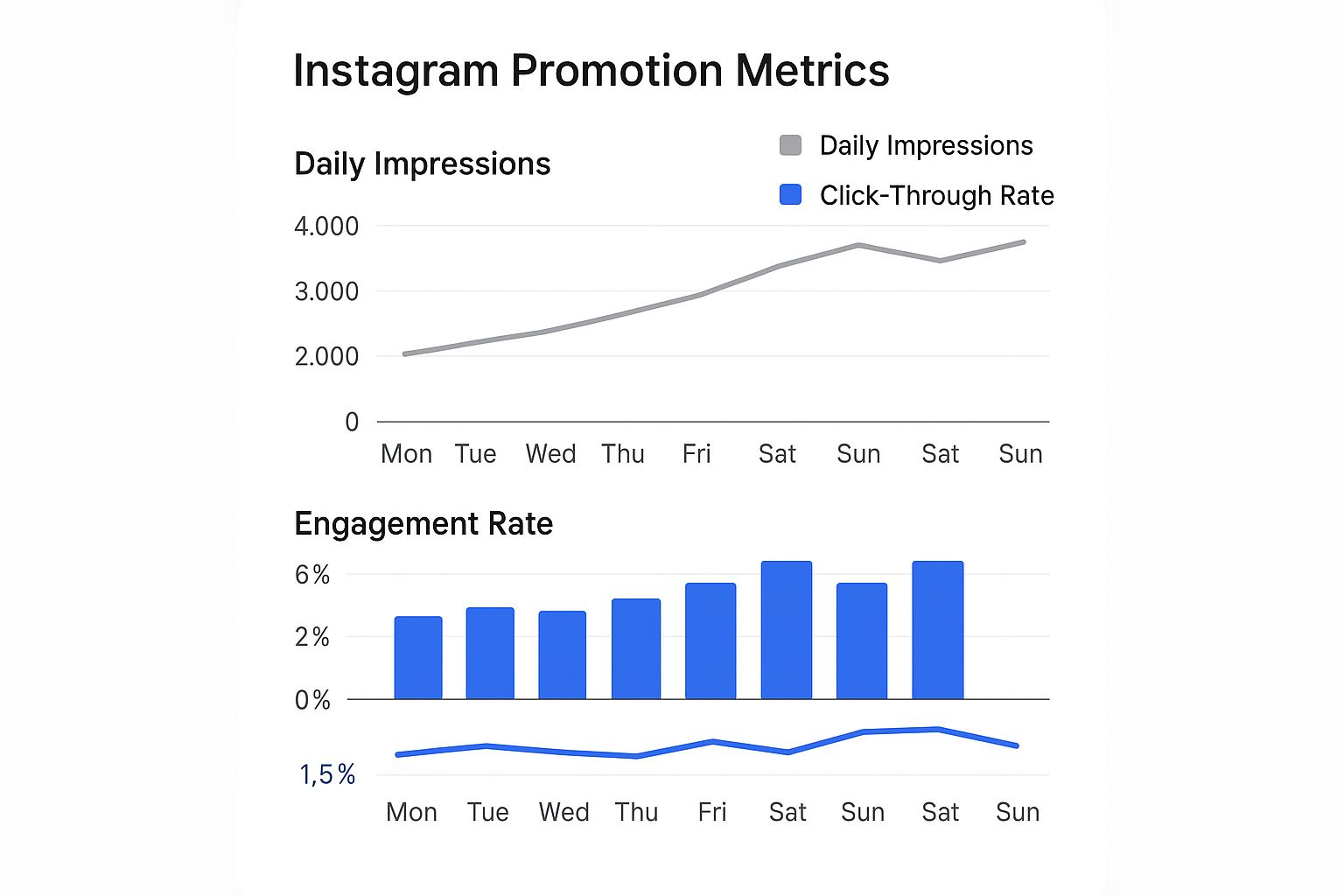
As you can see, impressions might climb steadily, but engagement and click-through rates can fluctuate day by day. This helps you pinpoint which days your ad really resonated with people.
To get a clearer picture of your performance, let's break down the essential metrics you'll find in your Instagram Insights dashboard.
Key Promotion Metrics and What They Mean
Looking at these numbers together gives you a complete story of your promotion's impact, moving beyond simple likes to understand true business value.
Fine-Tuning Your Audience With Demographic Data
Beyond the performance numbers, your insights also reveal who you actually reached. You’ll get a breakdown by gender, age range, and top locations. This data is your secret weapon for future campaigns.
Let’s say you targeted men and women aged 25-45. But after digging into the insights, you discover that 80% of your website clicks came from women aged 25-34. That’s a powerful discovery! For your next promotion, you can narrow your targeting to focus almost exclusively on this high-performing group, making your ad spend far more efficient.
The whole point of analyzing results isn’t just to see what happened; it’s to build a feedback loop. Every campaign, successful or not, provides lessons. Maybe one visual style drove way more clicks, or a specific call-to-action generated a flood of messages. These insights are vital for anyone looking to seriously improve their Instagram engagement and turn promotions into a predictable growth engine.
Use this post-campaign review to pinpoint what to double down on and what to abandon. It’s how you ensure every dollar you spend is smarter than the last.
{{INTERN}}
Answering Your Instagram Promotion Questions
When you're just starting to figure out how to promote on Instagram, it’s totally normal to have a ton of questions. Let's walk through some of the most common ones I hear, so you can move forward and get your ads running with confidence.
Boosting a Post vs. Using Ads Manager: What's the Real Difference?
This is probably the number one question people ask. It's easy to get them confused.
Think of the "Boost Post" button as the express lane. It’s built right into the Instagram app, making it super convenient and fast. If you're new to this or just want to get more eyes on a post you already know is performing well, it's a fantastic, straightforward option.
Meta Ads Manager, on the other hand, is the professional-grade control panel. This is where you go when you need more power and precision. It unlocks a whole different level of advertising tools:
- Pinpoint Targeting: Go way beyond basic interests. You can create custom audiences to retarget people who've visited your website, engaged with your profile, or even upload your own customer lists for a hyper-focused campaign.
- Specific Campaign Goals: In Ads Manager, you can optimize for goals that simply aren't available through the Boost button, like driving specific conversions on your site or getting people to fill out a lead form.
- Creative Freedom: Want to know which image or headline works best? Ads Manager lets you run A/B split tests to find out, so you're not just guessing what your audience wants to see.
- In-Depth Analytics: The reporting is far more detailed, giving you the deep insights needed to truly understand what's working and what isn't.
The bottom line: For simple goals like getting more profile visits or boosting engagement on a specific post, the Boost button is perfectly fine. But for more complex campaigns tied directly to sales, leads, or detailed audience building, Ads Manager is where you need to be.
How Long Should I Run My Instagram Promotion?
The right duration really comes down to your budget and what you're trying to achieve.
For most businesses just starting out, a sweet spot is running your promotion for 3-7 days. This gives the Instagram algorithm enough time to learn, optimize who it's showing your ad to, and gather enough data for you to make sense of the results.
Shorter campaigns of just 1-2 days can work for time-sensitive events like a flash sale, but you'll need a bigger daily budget to get enough eyeballs on it quickly. On the flip side, campaigns running longer than a week are great for broader brand awareness goals where you can use a smaller, steady daily budget to stay top-of-mind.
My advice? Always keep an eye on your performance metrics. If you see your results take a nosedive after a few days, that's a clear signal to pause the ad and rethink your creative or targeting.
"Why Was My Instagram Promotion Rejected?"
It's incredibly frustrating to have your promotion disapproved, but it almost always boils down to a violation of Meta's Advertising Policies. They have a lot of rules, and some are more common to break than others.
Here are a few of the usual suspects:
- Too much text on your ad's image.
- Making exaggerated or unsubstantiated claims ("Get rich quick!").
- Promoting restricted products like tobacco, weapons, or certain supplements.
- Using copyrighted music you don't have the license for in your video.
- Linking to a broken landing page or a URL that doesn't work.
Instagram will usually give you a reason for the rejection. Read it carefully, check the specific policy they flagged, and make the necessary edits. You can then resubmit it for review.
Can I Edit a Promoted Post After It's Live?
The short answer is a hard no. Once a post is being actively promoted, you cannot edit the caption, photo, or video.
If you hit "Promote" and then spot a glaring typo or decide you hate the image, you have to delete the entire promotion first. You'll be charged for whatever the ad spent up to that point.
After you've deleted the promotion, you can go back to the organic post on your grid and make your edits. Then, you'll have to set up a brand-new promotion from scratch. This is exactly why you should triple-check every single detail before you commit.
Ready to take your Instagram growth to the next level? BoostFluence provides the tools and strategies you need to increase your visibility, engagement, and followers. Grow smarter and faster with us at https://www.boostfluence.com.
Want to Grow Your Instagram?
Use BoostFluence tools to grow your followers, engagement, and authority — for ambitious agencies, businesses and creators.


Get More Instagram Followers
Reach your target audience and grow your followers with interactive campaigns.

Swipe Up to Get More Followers!
Get More Instagram Followers
Reach your target audience and grow your followers with interactive campaigns.